


WEEX Verification Code Not Received: SMS and Email Fixes and How to Contact Support
WEEX verification code not received is a problem that can affect a login, a withdrawal or another security step, and the fix depends on which type of code is missing. A code sent by SMS and a code sent by email travel by different routes, so they fail in different places.
When a WEEX verification code is not received by SMS, the checks focus on the phone, such as signal, storage and blocking settings. When a WEEX verification code is not received by email, they focus on the network connection, the inbox and spam filters. Working through the checks one at a time, and contacting customer service if none of them helps, is the quickest way to solve a WEEX verification code not received problem.
Why Is the WEEX Verification Code Not Arriving?
The usual places to look are on the receiving side. For an SMS code, that means mobile signal, a full message inbox, blocking features and blacklist filters on the phone. For an email code, it means the network connection, a full mailbox and spam or junk filters that catch the message before it reaches the inbox. The delivery system can also use a different sender on a later attempt, so a code that did not arrive the first time may arrive on a retry.
The first step is to identify which channel the code was sent to, since the checks differ. The request screen shows whether the code went to a phone number or an email address, and mixing up the two wastes time. The sections below follow the same split, going from the simplest check to the more involved ones.
What Should You Check First for a Missing SMS Code?
Start with the simple steps. Turn on airplane mode for one minute and then turn it off, move to a spot with stronger reception and request the code again. Then confirm that the phone can receive text messages at all and that the SMS inbox is not full, deleting old messages if needed. A phone that has been on for a long time can be rebooted, and on a dual-SIM phone, swapping the slots of the two SIM cards is worth trying.
If those steps do not help, the next group is about blocking. Disable SMS blocking features in the phone’s operating system and in any third-party apps that can block messages, and check whether a blacklist filter is enabled. Apps such as Message Manager can intercept messages, so uninstalling them and trying again is a reasonable step. Xiaomi and Huawei phones may have issues caused by malicious widgets or plugins, and iPhone users should check the messages blacklist setting in case the WEEX sender number was added by mistake.
What Should You Check First for a Missing Email Code?
Start with the connection and the device. Switch between Wi-Fi and cellular data or restart the network connection, then close all software, restart the phone or device and request the code again. Make sure the email inbox is not full, since a full mailbox cannot take new messages.
Then look at the mail filters. Check whether the verification email was flagged as spam or sent to the promotions folder. In Outlook, check the Junk Email folder, review the junk mail rules, clear blocked senders and domains, and then request the email again. In email, check the Spam folder, review the anti-spam rules, clear blacklisted senders and domains, set the Spam Handling option to Accept and then request the email again. Other mail providers have their own filter settings, which are found on the provider’s own help pages.
How Many Times Should You Retry Before Asking for Help?
Trying a few more times is reasonable, because the delivery system may switch senders to improve the chance of delivery. There is no fixed number of attempts or waiting time to rely on, and the only specific time in the checklist above is the one minute of airplane mode. Any interval or limit quoted elsewhere should not be treated as a WEEX rule unless WEEX states it.
A practical approach is to change one thing between attempts, such as the signal, the connection or a filter setting, so it is clear which change helped. Requesting the code many times in a row without changing anything adds no new information. Once the SMS or email checks have all been tried and the code still does not arrive, the next step is customer service.
Where Can You Find WEEX Customer Service
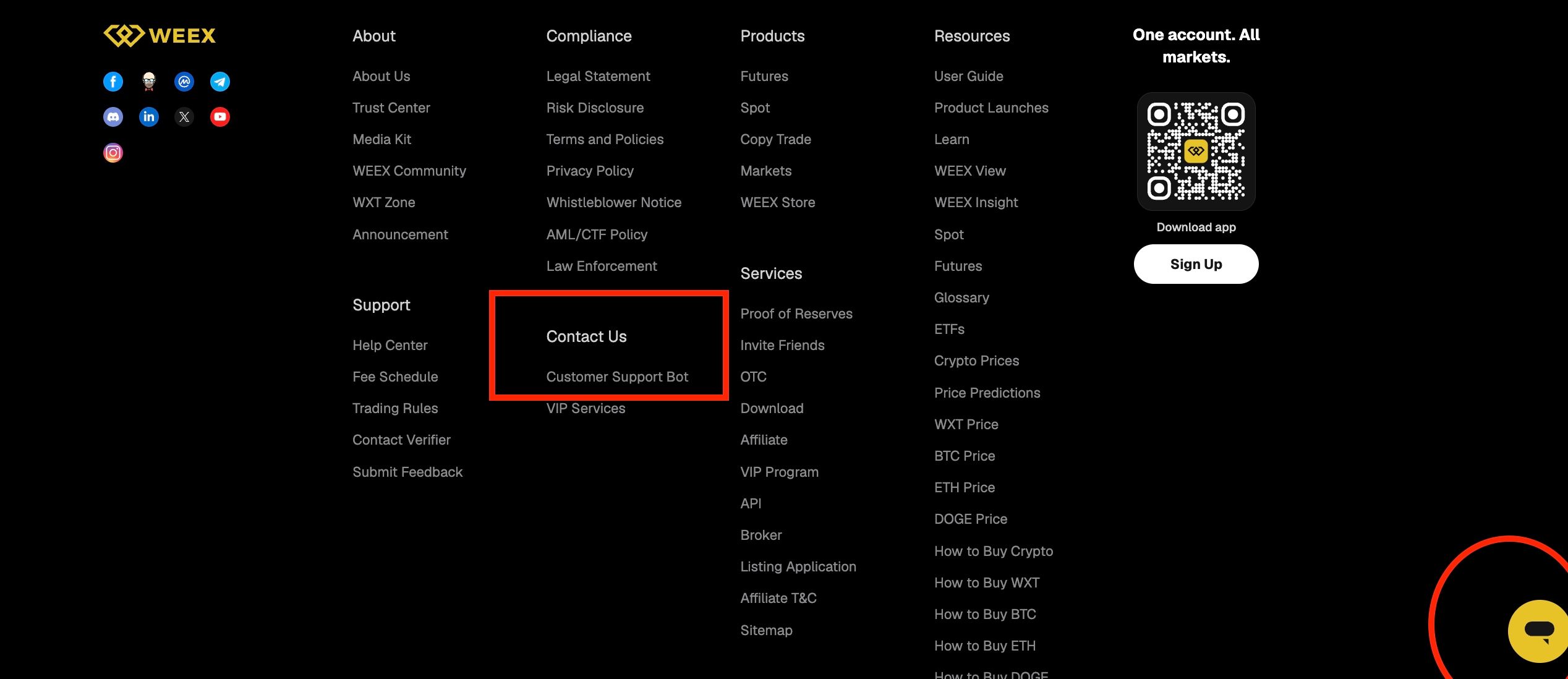
On the WEEX website, the footer has a Support section, and under Contact Us there is a Customer Support Bot link. There is also a chat button at the bottom right corner of the page, and the AI customer service there can lead to a live customer service agent.
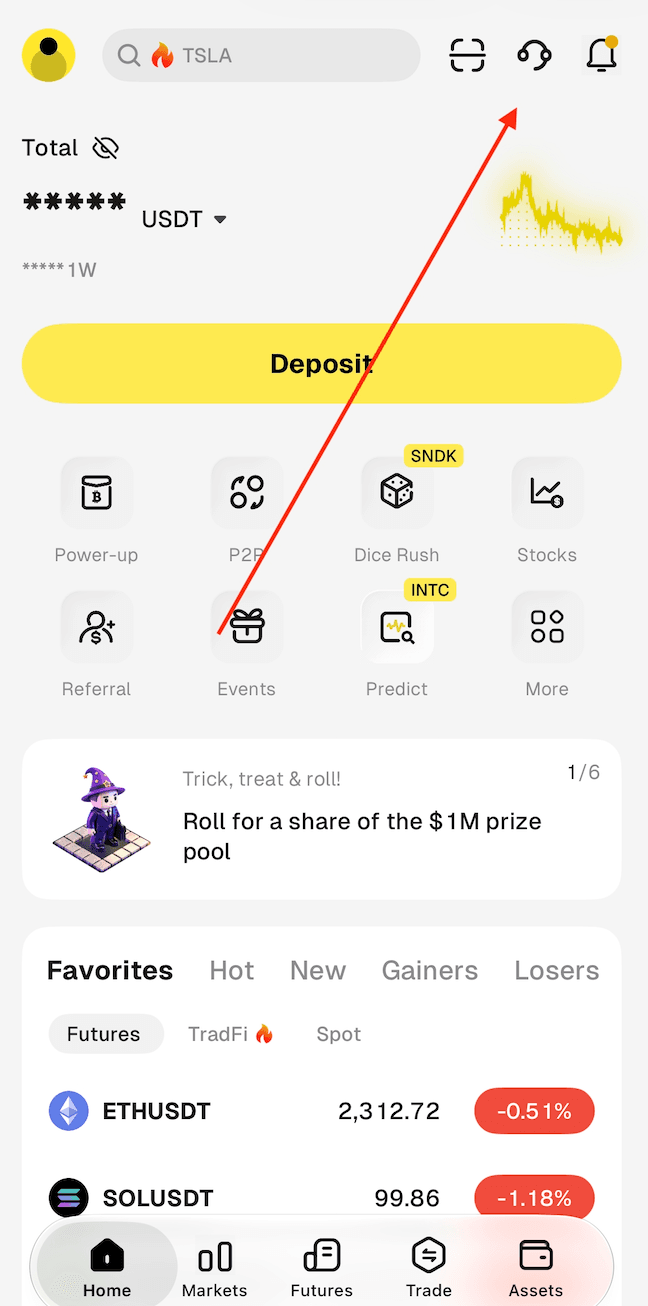
In the WEEX app, the customer service entry is the headset icon at the top right of the Home screen, next to the scan and notification icons.
Before contacting customer service, note which type of code is missing, when it was requested, what has already been tried and which phone or email provider is used, since this saves a round of questions. A verification code and a password should never be shared with anyone. WEEX official channel admins will never contact users privately to request personal, financial or account information, and will never ask them to transfer funds, so any message that does is a possible impersonation that should be reported.
Conclusion
When a WEEX verification code is not received, the first step is to identify whether the missing code is an SMS or an email. For SMS, the checks cover signal, storage, blocking and phone-specific settings. For email, they cover the connection, the inbox and spam or junk filters.
Trying again a few more times is reasonable, and changing one setting between attempts shows what works. If the code still does not arrive, use the customer service entry in the app or on the website, and keep every verification code private. A WEEX verification code not received issue is usually easiest to solve by changing one setting at a time and testing after each change.
FAQ
1. Why is my WEEX verification code not received by SMS?
Common checks are signal, a full message inbox, SMS blocking, blacklist filters and SIM settings. Work through them one at a time and request the code again.
2. Why is my WEEX verification code not received by email?
Check the network connection, a full inbox and the spam, promotions and junk folders. Outlook and QQ Mail have their own junk and spam rules to review.
3. How many times can I request a WEEX verification code?
Trying a few more times is reasonable because the delivery system may switch senders. No fixed number of attempts or waiting time should be assumed.
4. Where do I find WEEX customer service if the code is still not received?
In the WEEX app, use the headset icon at the top right of the Home screen. On the website, use the Customer Support Bot under Contact Us in the footer or the chat button at the bottom right.
5. Is it safe to share a WEEX verification code with customer service?
No. A verification code should never be shared with anyone, and WEEX official channel admins will never request personal, financial or account information.

Gainers


