


WEEX KYC Pending: How to Check Your Verification Status and What to Do While You Wait
WEEX KYC pending is the status shown after identity documents are submitted and before the review result is returned. On the verification page, the status reads Under review, and the page states that the review should only take a few minutes and that a notification will follow once it is complete. In most cases, the result arrives quickly, so a pending state is usually brief.
Still, seeing WEEX KYC pending for longer than expected can feel unclear, because the page shows only a short progress list. Knowing where to find the status on the website and in the app, and what each state means, makes it easier to tell a normal short wait from a result that needs action.
What Does the Under Review Status Mean?
On the WEEX website, the verification page shows a progress list with three steps: ID submitted, Under review and Verification complete. When the first two steps are checked and the third is still grey, the documents have been received and are waiting for a result from WEEX’s third-party verification provider. Below the list, the page says the review should only take a few minutes and that WEEX will notify the user once it is complete.
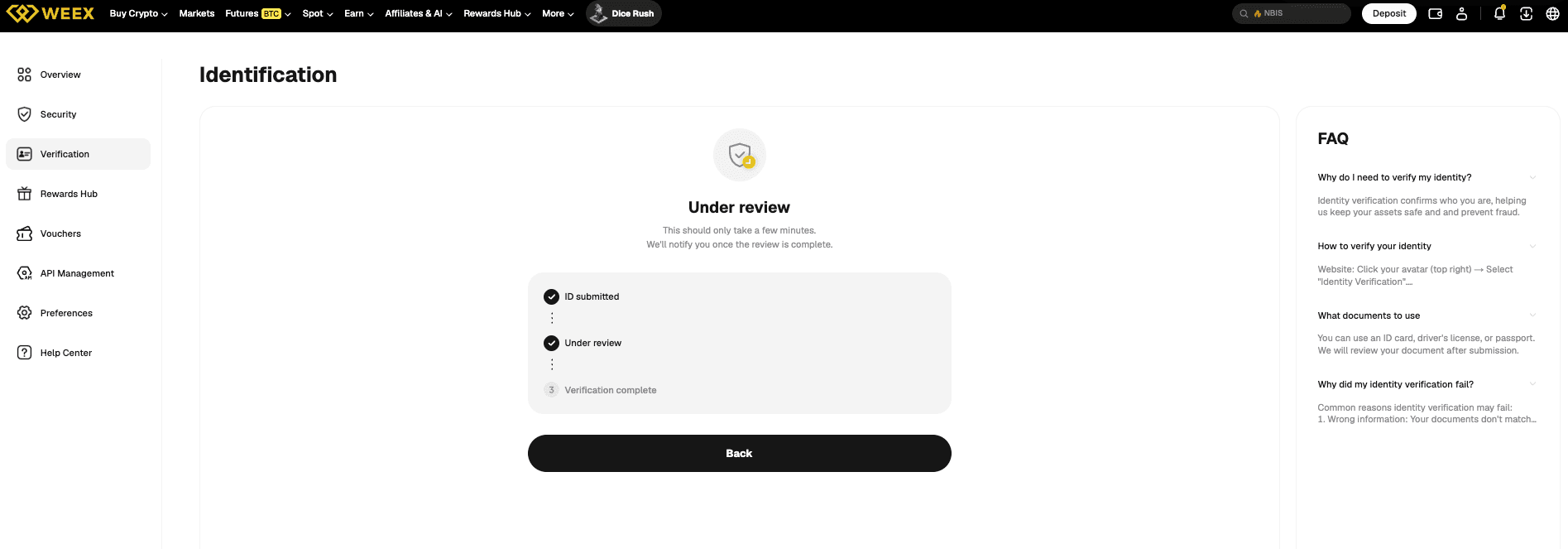
A pending status is not a failure. It only means that no result has been returned yet. If the review ends with a problem, the status changes to Failed and the page shows a reason, which is covered in the last section below.
How Long Does WEEX KYC Verification Usually Take?
The verification provider usually returns a result within a few minutes. This matches the wording on the verification page, which says the review should only take a few minutes. A long pending state is less common than a quick pass or a quick failure.
If the photo or the face scan has a problem, the provider usually does not leave the case waiting. It asks the user to resubmit the relevant materials instead, and the user can then continue from the verification page. For this reason, a status that stays on Under review for much longer than a few minutes is worth checking rather than ignoring.
How Can You Check Your Verification Status on Web and App?
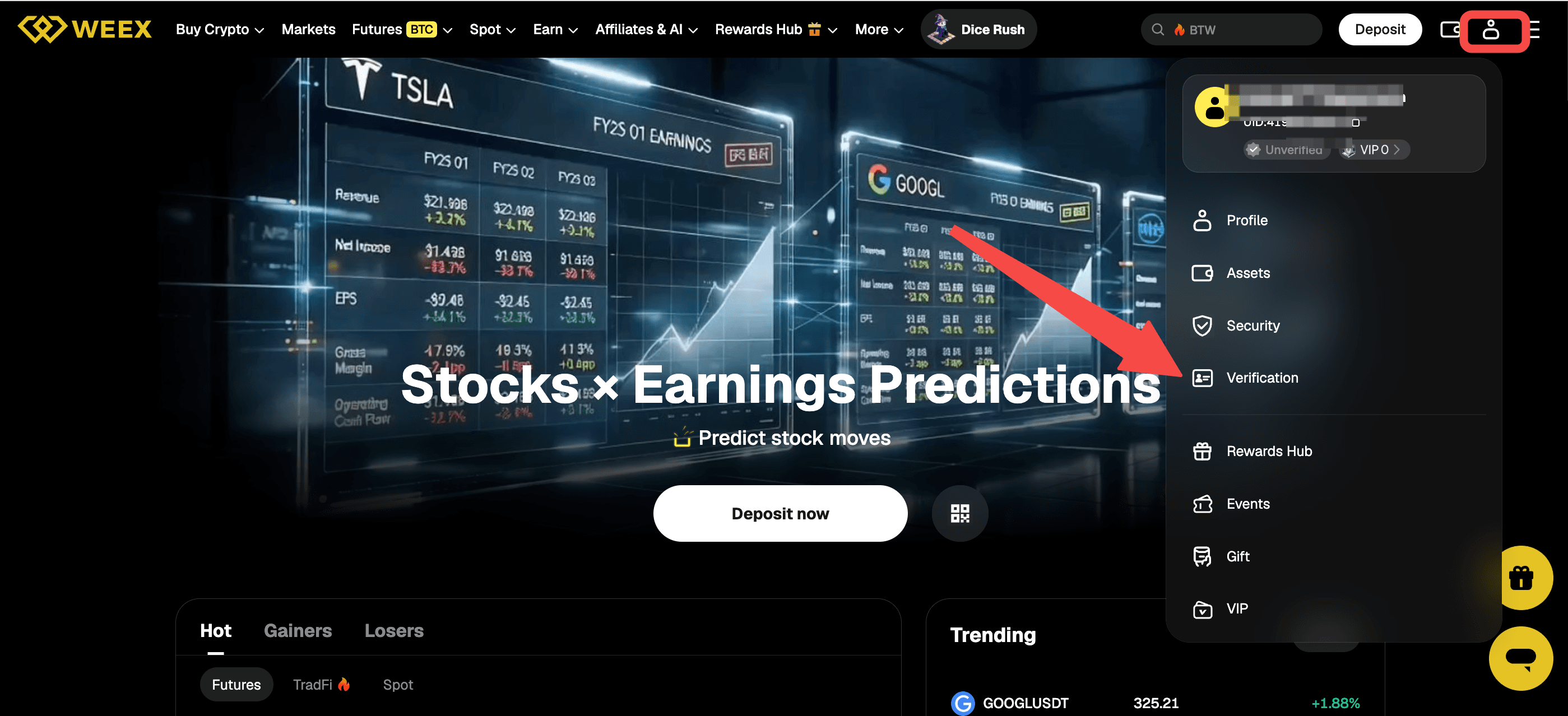
On the website, click the account icon at the top right and choose Verification from the menu. The account card at the top of the same menu also shows the current state, such as Unverified, next to the VIP level.
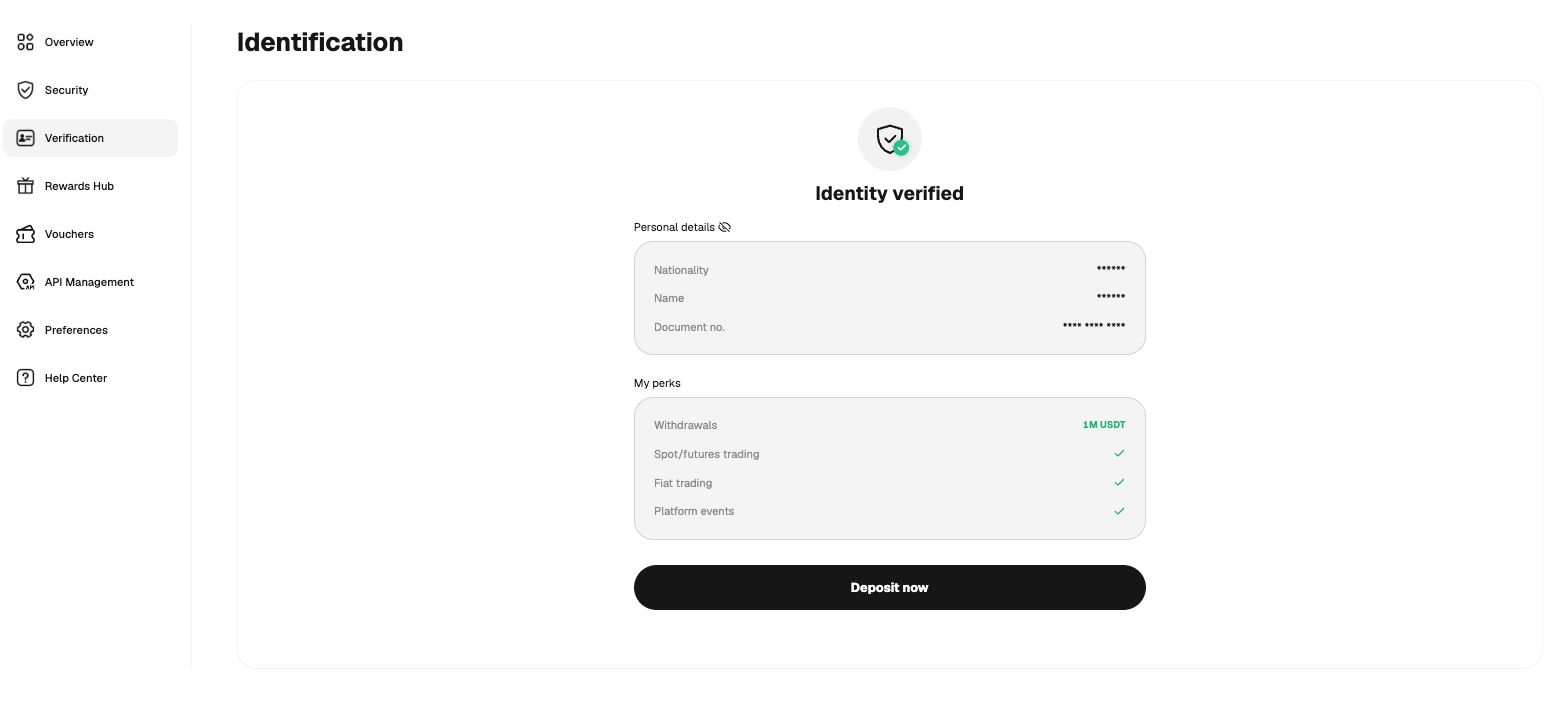
The Identification page then shows the current status. A completed review shows Identity verified, with personal details hidden by default and a My perks panel listing what the verified account can use.
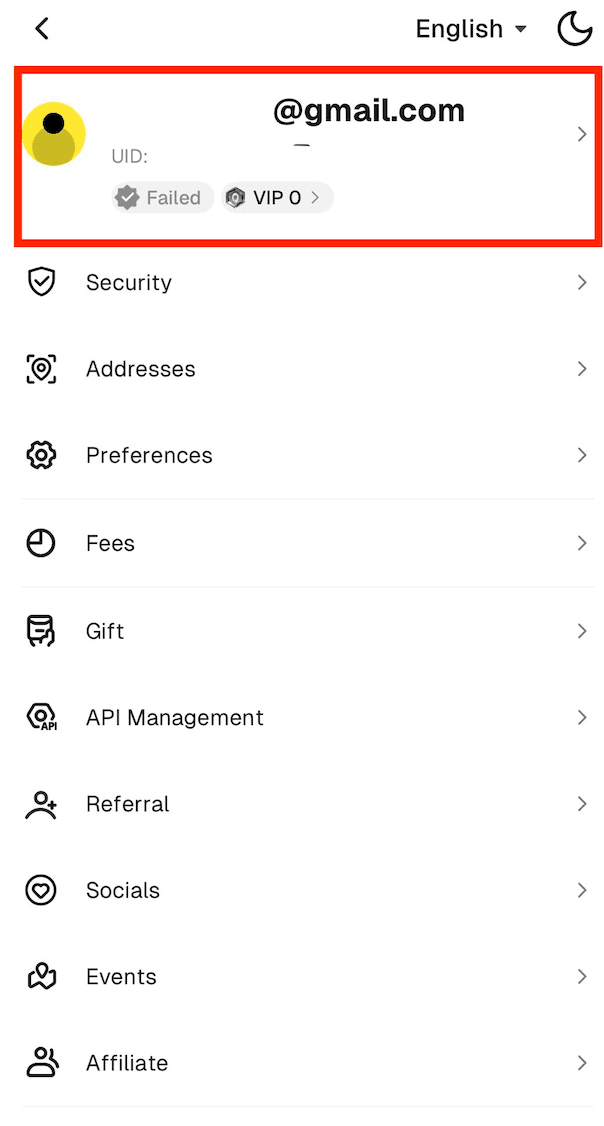
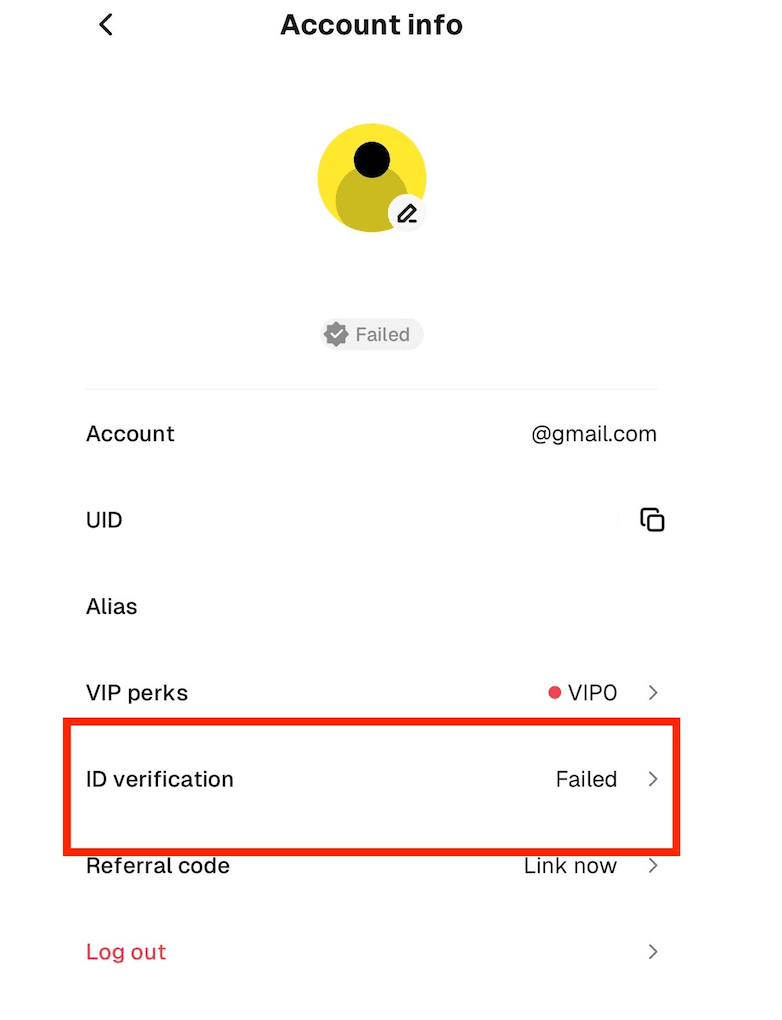
In the app, tap the avatar icon at the top left of the Home screen to open the account menu. The profile area at the top of that menu shows the verification badge beside the VIP level, such as Failed or Verified. Tapping the profile area opens Account info, where the ID verification row shows the current status. Tapping that row opens the verification page.
What Should You Do While the Status Is Still Pending?
The first step is to wait a few minutes and reopen the verification page, since most results arrive in that time. WEEX sends a notification when the review is complete, so the result may also appear there before the page is checked again.
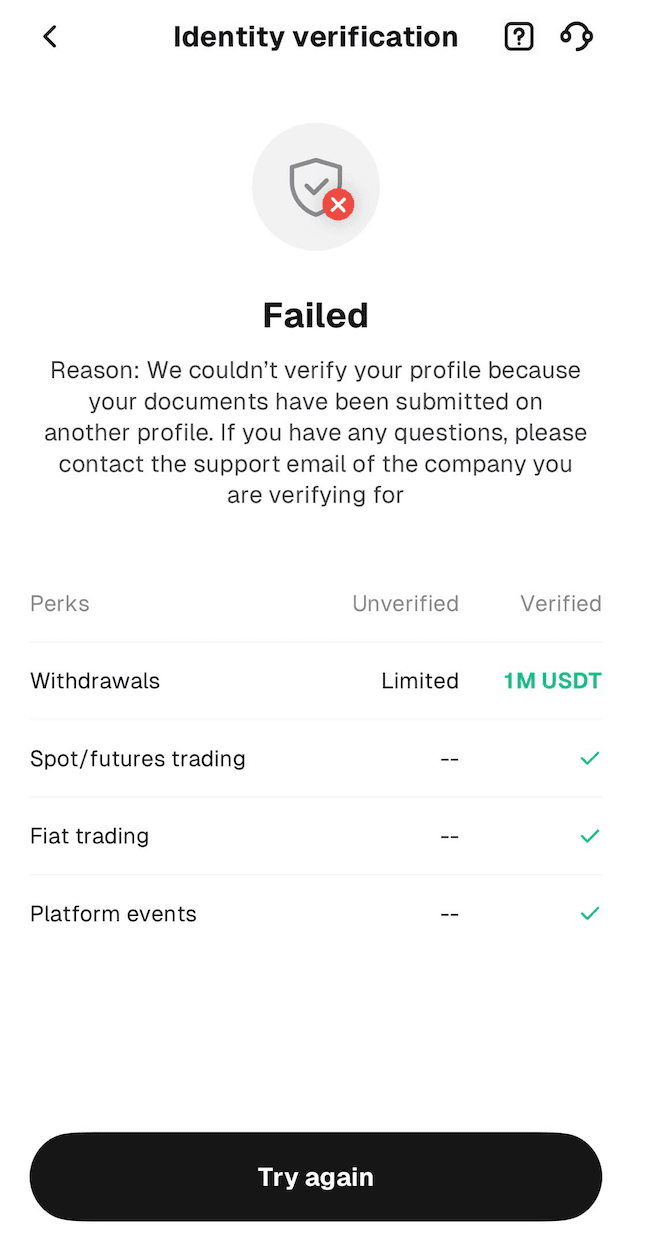
It also helps to look at the My perks panel on the verification page. The panel compares an unverified account with a verified one and lists withdrawals, spot and futures trading, fiat trading and platform events, which shows what a completed verification is for.
If the status stays on Under review for much longer than usual, contact customer service. On the website, the Support section in the footer leads to Contact Us and then to the Customer Support Bot, and a yellow chat button sits at the bottom right of the page. In the app, the headset icon appears at the top right of the Home screen, and the same icon also appears at the top right of the Identity verification page. More details are in WEEX’s contact support guide.
What Happens If the Verification Fails Instead?
If the review does not pass, the status changes to Failed and the verification page shows the reason. One example reason shown in the app is that the documents have already been submitted on another profile. The page also offers a Try again button, so the user can start the process again from the same screen.
Different failure reasons need different fixes, which are covered in WEEX’s guide on failed KYC verification. The steps for submitting verification are in the guides for the web version and the app version.
Conclusion
WEEX KYC pending is a short waiting state between submitting documents and receiving the review result. The verification page on web and the account menu in the app show whether the status is Under review, Identity verified or Failed. Most results arrive within a few minutes, and a status that stays pending much longer than usual is a reason to contact customer service.
FAQ
1. What does WEEX KYC pending mean?
WEEX KYC pending means the identity documents have been submitted and the review result has not come back yet. The verification page shows this as Under review.
2. How long does WEEX KYC pending usually last?
WEEX KYC pending usually lasts only a few minutes, as the verification page states. A longer wait is less common.
3. Where can I check my WEEX KYC status?
On the website, click the account icon at the top right and choose Verification. In the app, tap the avatar icon at the top left of Home, open the account menu and check the badge or the ID verification row, so the WEEX KYC pending state or the final result is easy to find.
4. What should I do if WEEX KYC stays pending for too long?
If WEEX KYC pending lasts much longer than a few minutes, contact customer service through the Customer Support Bot on the website or the headset icon in the app.
5. What happens if my photo or face scan has a problem?
The verification provider asks the user to resubmit the relevant materials. If the result is Failed instead of WEEX KYC pending, the page shows the reason and a Try again button.

Gainers


